
Capture
Ingrid Studio
Multichannel ingest and playout in one system
Ingrid Studio is a versatile, all-in-one media solution that simplifies contribution ingest, playout and post-production. Designed as a standalone application, it connects video contribution, ingest, playout and post in a single platform — for live broadcasts, multicamera setups and ready-to-air delivery, through one user-friendly web interface.
Record and cut at the same time
Edit-while-ingest lets post-production start during the recording. For news and live sport that is the difference between making the bulletin and missing it.
One source, several outputs at once
From the same feed Ingrid Studio simultaneously generates a high-resolution master, a proxy file and a live stream — no second pass, no waiting.
Writes that survive a bad network
Asynchronous writing to external storage with bandwidth optimisation, even over low-bandwidth connections, without dropping a single frame.
Capabilities
What Ingrid Studio actually does
Multichannel in, multichannel out
Record from SDI (3G / 6G / 12G), SRT, NDI, WebRTC and SMPTE ST 2110, at anything from SD to 4K, with all major codecs and up to 16 audio channels per input. Play out to the same set of formats and protocols, with up to 16 audio channels per output.
Up to 8 channels of Full HD I/O, or 2 of UHD, with gang mode to tie channels together and loop recording for continuous capture.
Edit-ready on the way in
Direct encoding to post-production-ready formats — ProRes, DNxHR, XDCAM and AVC-Intra — in standard containers: MOV, MXF (Op1a and OpAtom) and MP4. That removes the transcoding step that normally sits between ingest and edit, and it is where most of the time is recovered.
With the Avid plug-in, files can be checked into Interplay and MediaCentral while they are still ingesting.
Live logging that becomes the playlist
Real-time live logging, playlist creation from those markers, and flexible ingest scheduling with customisable rules. Advanced search by date, time and other parameters means the clip marked at 14:02 is the clip played at 14:09.
Synchronous playback runs multiple streams together by timecode — gang mode for video walls.
Hardware control for people who work at speed
Full support for JLCooper Slomo Elite, Elgato Stream Deck and Contour Shuttle Pro v2. Operators who work a jog wheel all day do not want a mouse, and the system does not make them use one.
Redundancy at every layer
Simultaneous recording to internal storage and external devices, real-time mirror recording, RAID 1 and RAID 5 configurations, and server mirroring with master and slave channels on two separate machines. Lifecycle data management automates deletion and external archiving so the storage never silently fills.
In the interface
See it working
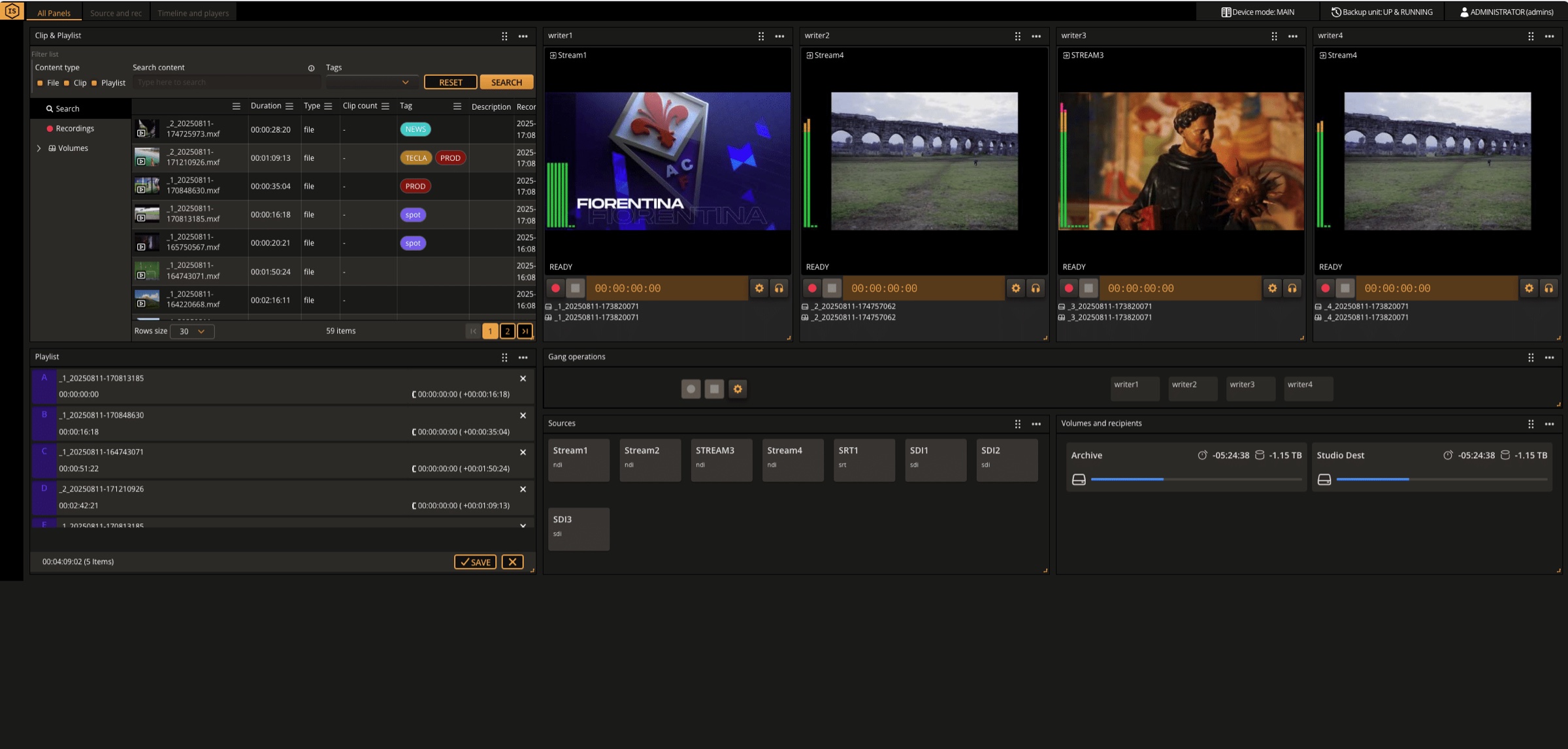
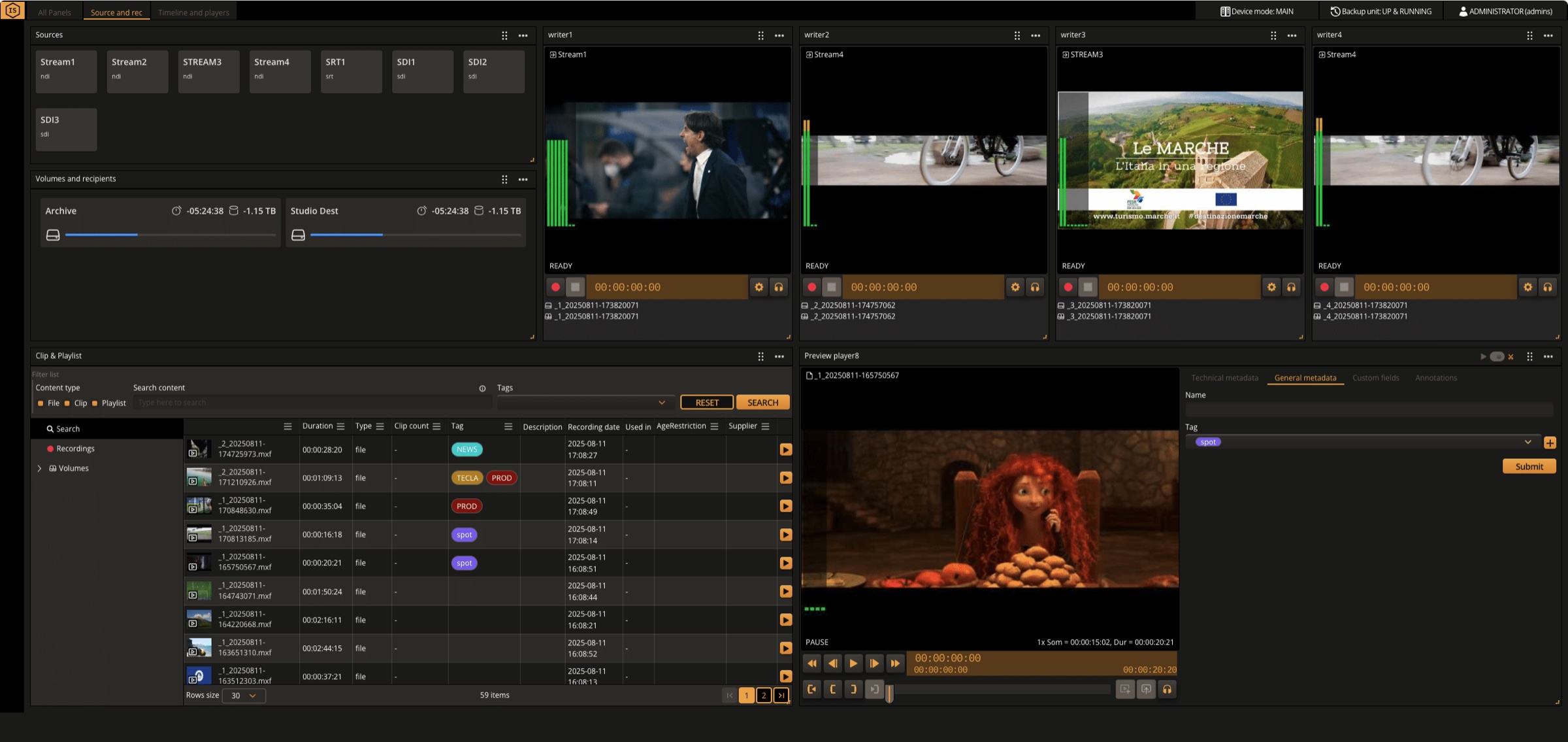
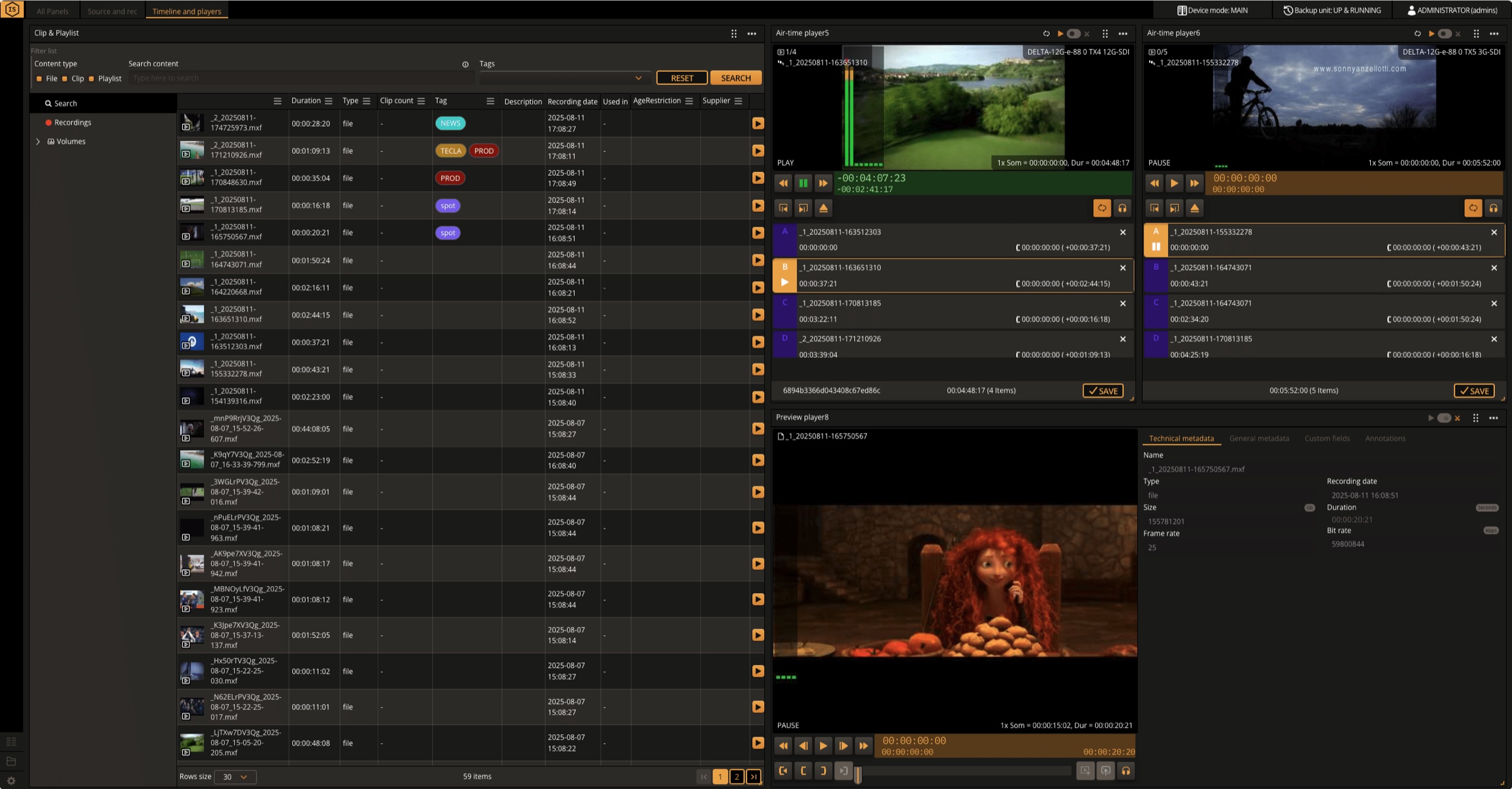
Three views of the same session: the full control surface, the source and record panel, and the timeline where logging becomes a playlist.
Feature list
Everything Ingrid Studio ships with
Multichannel recording
- Up to 8 channels I/O Full HD, or 2 I/O UHD
- Simultaneous recording from multiple cameras
- Resolutions from Full HD 1080p to 4K
- Scheduled and manual recording modes
- Gang mode — multiple channels ganged together
- Loop recording
Video compression
- H.264, H.265 and H.265+
- XDCAM (50–35), XAVC, DNxHD, DNxHR, MP4, ProRes
- Broadcast-standard formats with predefined bitrates
- Simultaneous multi-format recording
- Containers: MOV, MXF (Op1a, OpAtom), MP4
Storage management
- Internal and external drives or SSDs
- RAID redundancy — RAID 1 and RAID 5
- Simultaneous recording to multiple devices
- Real-time mirror recording
- Export and archive to NAS, USB or cloud servers
- Lifecycle data management with automated deletion and archiving
Playback and analysis
- Synchronous playback of multiple streams by timecode
- Gang mode for video walls
- Advanced search by date, time and other parameters
- Edit-while-ingest on selected formats
Audio
- Up to 16 channels, 32-bit / 48 kHz
- Dante audio support via a dedicated LAN port
- Channel routing and mapping across different sources
Control and security
- Full web-based GUI
- Web / REST API and keyboard-mouse control
- JLCooper Slomo Elite, Elgato Stream Deck, Contour Shuttle Pro v2
- Multi-level permissions and authentication
- Per-user metadata logging layouts and ingest/play configurations
- Event logs of user access and system operations
Network
- IP camera integration
- Remote access over internet, VPN or LAN
- Email, SMS and push notifications
- Server mirror — master and slave channels on two servers
Specification
The numbers, in full
Need a signed-off configuration for a tender? Ask and we will send the full technical annex with the exact build for your channel count.
Request the technical annex| Capacity | |
|---|---|
| Channels | Up to 8 Full HD I/O, or 2 UHD I/O |
| Resolution | SD to 4K |
| Audio | Up to 16 channels per input and per output, 32-bit / 48 kHz |
| Signal and transport | |
| Inputs | SDI 3G / 6G / 12G, SRT, NDI, WebRTC, SMPTE ST 2110 |
| Outputs | SDI 3G / 6G / 12G, SRT, NDI, WebRTC, SMPTE ST 2110 |
| Audio transport | Dante, on a dedicated LAN port |
| Formats | |
| Codecs | H.264, H.265, H.265+, ProRes, DNxHD, DNxHR, XDCAM (50–35), XAVC |
| Containers | MOV, MXF (Op1a and OpAtom), MP4 |
| Simultaneous outputs | High-resolution master, proxy and live stream from one source |
| Resilience | |
| Disk | RAID 1 and RAID 5 |
| Recording | Mirror recording and simultaneous write to multiple devices |
| System | Server mirror — master and slave channels on separate servers |
| Control | |
| Interface | Full web-based GUI |
| API | Web / REST API |
| Panels | JLCooper Slomo Elite, Elgato Stream Deck, Contour Shuttle Pro v2 |
Deployment
On-premise
Runs on standard enterprise servers in your own plant. No proprietary hardware, no vendor-locked appliance, no forklift upgrade.
Hybrid
Keep the signal path local and move the elastic parts — transcoding, archive, disaster recovery — to the cloud, one workflow at a time.
Cloud
The same build, deployed on the major clouds. Identical interfaces, identical behaviour, identical support contract.
Integrations
It has to work with what you already run
Asset management
- Synaxis
- MediaHive
- Avid Interplay
- Avid MediaCentral
Editing
- Adobe Premiere Pro
- Avid
- DaVinci Resolve
Audio
- Dante
- Embedded SDI audio
Companion products
- Ingrid Capture
- Panorama+
- Dynamo
Typical use cases — Live broadcast galleries · Multicamera studio production · OB vans and remote production · Post-production ingest bays · Ready-to-air delivery
Continue
Works well alongside
Try it
Run Ingrid Studio on your own hardware
A working trial build, sent to your inbox. Install it on a machine you control, point it at your own sources, and see what it does with your formats rather than ours.
What you get
- 01A download link by email. It arrives at the address you enter below, so use one you can read.
- 02The full suite, not a cut-down build. Ingest, playback, logging and the scheduling interface.
- 03An engineer, if you want one. Tell us what you are testing and we will join a call rather than leave you with a manual.
Trouble with the form? Write to info@teclasystem.com and we will send the link by hand.
See Ingrid Studio on your own material
We run demos with your formats, your protocols and your constraints — not a canned dataset.